Make Your Grimoire an Obsidian Vault
After experimenting with Google Docs, Wordpress, Evernote, Notion, and others, I have finally decided that for me, the best way to keep my Grimoire is in an Obsidian Vault, which is fundamentally just a collection of markdown files in a folder.
Why?
- It’s free, saving your mad money for more tarot cards.
- It’s just as private as you want it to be, the degree is up to you.
- You can sync it with a self-hosted service if you’ve got a spare linux server somewhere, or with a paid service if you don’t mind it living on someone else’s cloud. This lets you reach it from lappy, desktop, tablet or phone.
- You can format your text simply and elegantly, leaving more of your brain power for writing
- You can still keep images and links in your text if you want
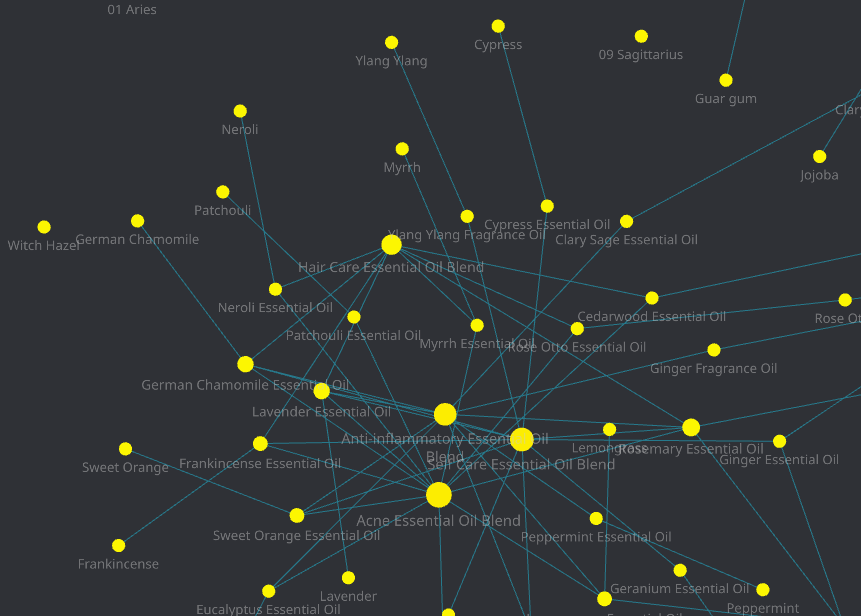
- Cross-linking throughout your vault is easy with [[Wiki-style links like this]], which not only makes you more efficient at learning but also enables graph view in Obsidian, which shows a visual depiction of your ideas to help you discover themes in your research.
- Scripting and free plugins can easily make it work exactly the way you want.
- Free themes and customizable css can easily make it look the way you want.
- You can store it encrypted on a consecrated USB amulet if that’s your thing.
- Sharing a document with a coven member need not include attribution – an md file can be as anonymous as you like.
- If you decide to publish parts of your work on the web later, you’ll have a head start as it’s very simple to turn md files into html
- It’s future-proof: you won’t need to rewrite your grimoire next time technologies change, as the format is open and widely used.